Explore questions about your payroll costs, statutory contributions, employee history, leave and accounting journals. Harvester already provides read-only AI reporting through connected AI assistants; the new in-Harvester assistant offers a first release of company-level reporting and Help answers.
Explore AI Payroll Reporting. No company payroll records are accessed or displayed here. Log in to explore existing reporting access.
See examples of what you can achieve with Harvester. The sample reports use entirely fictional employees and figures. Downloading samples and copying questions do not use your quick-question allowance.
1. Historical NAPSA reporting — all employees
Ask connected ChatGPT for a comprehensive Excel workbook, with accumulated contributions, annual or combined archive totals, retained monthly evidence and estimated equivalent months where justified.
Eight worksheets include historical coverage, annual totals, employee totals, employee-year history, monthly evidence, estimated months and notes. Archive markers are not necessarily calendar years; recorded earnings do not prove continuous employment or remittance.
Prepare a draft consolidated journal, a wages-by-department journal using saved hours allocations, or a detailed journal by current department and payroll class.
Fictional consolidated journal (ZMW)
Account category
Debit
Credit
Gross wages expense
40,000.00
—
Employer NAPSA and NHIMA expense
2,400.00
—
Statutory payables
—
8,900.00
Net wages payable
—
33,500.00
Total
42,400.00
42,400.00
Draft only: account mappings must be confirmed, and any unresolved reconciliation differences must be investigated. Not ready to import or post.
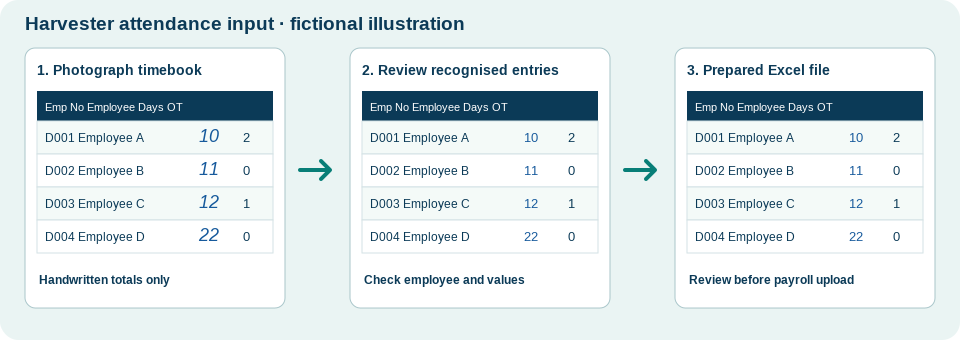
Photograph handwritten totals, review the recognised values and download a prepared standard Offline Input workbook. Larger payrolls can use completed Excel timebooks or biometric CSV/Excel totals directly in Harvester, without consuming photo allowances.
Illustration only — fictional employees, not an actual customer timebook or screenshot.Open AI Automated Payroll InputSuggested question for connected AI file preparationOpen ChatGPT
For routine conversion, use the built-in Harvester tool. Connected AI can assist with uploaded files where file editing is supported; always verify the result before normal payroll import.
Explore the reporting topics below. Select a question to put it in the question box. For individual employee details, accumulated employee totals and authorised loan history, copy the question and open a new ChatGPT chat with Harvester connected.
Harvester distinguishes retained monthly records, annual archives and combined older archives. Missing records are not zero. Historical gross may be reconstructed and archive markers may not represent individual calendar years.
Are statutory contributions proof of payment?
No. PAYE, NAPSA and NHIMA figures reflect recorded payroll amounts, not proof of remittance. Leave and benefit balances are indicators based on retained records, not certified liabilities.
Can AI change payroll?
Existing AI reporting is read-only. The in-Harvester assistant uses approved reports and will not change wages, post payroll or accounting journals. Draft journals require account mapping and reconciliation before use.
Do I need an external AI account?
Existing connected reporting uses a compatible external AI assistant. The direct interface uses Harvester's configured AI service for licensed users without a separate AI account.